BMW M5 Fog Night AI Photo Prompt (Copy-Paste)
To make the BMW M5 fog night photo, attach one full-length photo of yourself to an image app and paste the prompt below: you lean on the hood of a black M5 between its lit headlights, in thick fog on wet asphalt. For the exact car from one photo, use the Photo with a BMW M5 template.
By Outwow StudioExamples made
In short
- Updated October 2026. The prompt below is for any image app that accepts a photo, such as Gemini or ChatGPT.
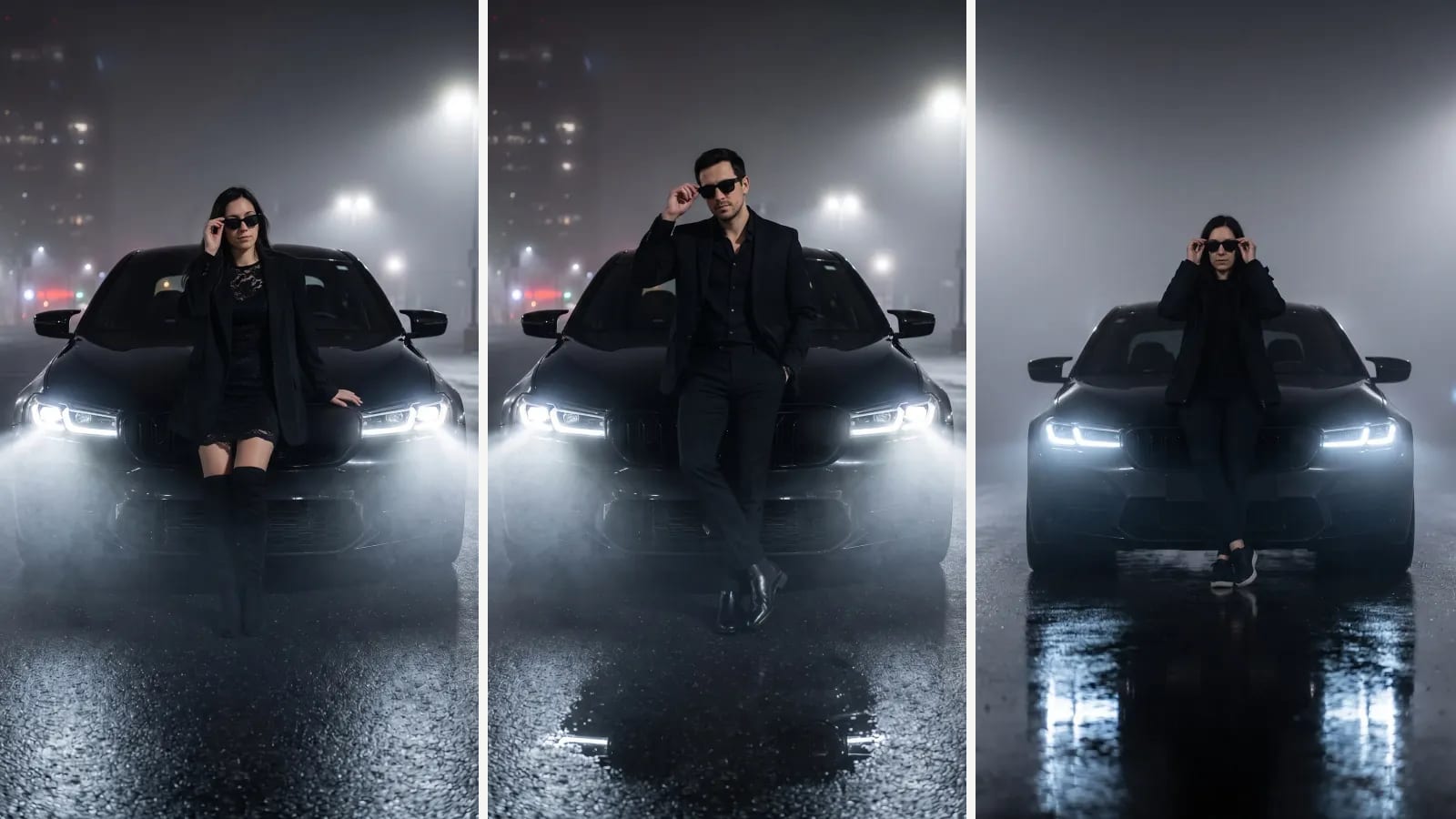
- The look: you leaning on a black BMW M5 at night, two headlight beams cutting through thick fog, wet asphalt below.
- Attach a full-length photo taken in daylight. A close selfie gives the app no body or outfit to place by the car.
- Our template makes the same shot from one photo, using a reference image of the car, for 1 photo a run.
What the BMW M5 fog night trend is
It is a night portrait with a black BMW M5 of the F90 generation: the person leans on the hood between the lit headlights, often lowering a pair of sunglasses, in fog thick enough to turn the headlights into two beams of light. Through summer 2026 prompt sites published lists of BMW prompts for Gemini and ChatGPT, such as Tenorshare's list from August 2026, so people could put their own photo into the scene.
The copy-paste prompt
Open an image app that takes a photo with the prompt. In the Gemini app you upload the photo and ask for an edit in the same message, as Google's help page describes. Attach one full-length photo of yourself, then paste this:
Use my attached photo as the person. Keep my face, hair, skin tone and body exactly as they are. Late at night I lean back on the hood of a black BMW M5 F90 Competition sedan, centered between its lit, narrow angular LED headlights, adjusting black sunglasses. Thick fog, two bright headlight beams through the haze, wet mirror-like asphalt. All-black outfit, low camera angle, realistic photo, vertical 3:4, full length. No text, no logos, no license plate.
- The first two sentences come first on purpose. Image apps can drift toward a generic face unless they are told what to keep.
- "F90 Competition" and "narrow angular LED headlights" pick the generation from the trend photos. Without them, our first run drew an older M5.
- "Centered between its lit headlights" is what makes the shot: the beams frame you from both sides.
- "Low camera angle" and "full length" keep the whole car front and your shoes in the frame.
- The last sentence asks for no badges or plates. Apps don't always listen: ours still drew a small M badge on the grille.
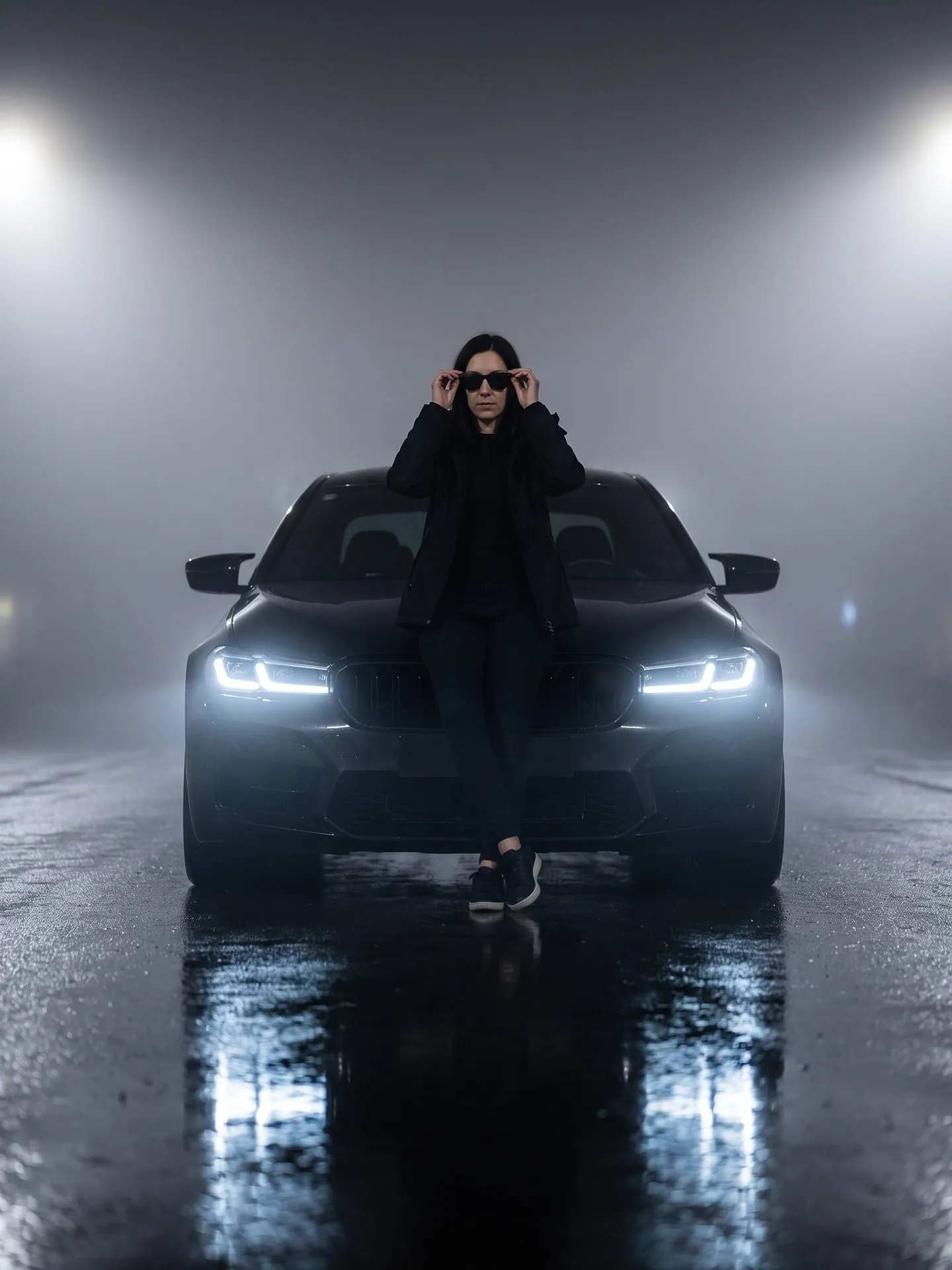
The run kept her face, the sunglasses pose, the fog and the beams, and it drew the F90 front end: narrow angular LED headlights and the wide kidney grille. That part needs the words. A run of the same prompt without "F90 Competition" and the headlight shape drew an older M5 with round ring-style headlights. From words alone, the app guesses which M5 you mean. Our first run of the final text had a different flaw: her legs came out half see-through in front of the grille, so we ran it once more, and the photo above is that run. Check the legs and feet before you post. The scene came out plainer than the template's, just fog with no streetlights or buildings behind; add "blurred streetlights behind" if you want a city.
Variants: rain and neon
Both variants keep the same first two sentences, the same car description and the same last line, so your face, the F90 and the no-logo rule stay in place. Only the scene changes. We have not run the variants ourselves; only the main prompt above is tested.
Use my attached photo as the person. Keep my face, hair, skin tone and body exactly as they are. At night in heavy rain I stand in front of a black BMW M5 F90 Competition sedan with narrow angular LED headlights, wearing a long black coat. Raindrops caught in the headlight beams, puddles reflecting the lights, city lights blurred behind. Realistic photo, low camera angle, vertical 3:4, full length. No text, no logos, no license plate.
Use my attached photo as the person. Keep my face, hair, skin tone and body exactly as they are. At night I lean on the hood of a black BMW M5 F90 Competition sedan with narrow angular LED headlights on an empty street lit by pink and blue neon light strips. Neon reflections on the glossy paint and wet asphalt. Black outfit, realistic photo, vertical 3:4, full length. No readable signs, no text, no logos, no license plate.
Which photo to attach
- Full length, head to shoes. The pose leans your whole body on the car, so the app needs to see it.
- Daylight or even indoor light on your face. The scene is dark, and a dark input loses your features twice.
- Face the camera without sunglasses. The prompt adds them, and it can only keep eyes it has seen.
- One person in the frame. With two, the app has to guess who leans on the car.
- A plain outfit is fine: the prompt dresses you in black anyway.
The one-tap version: Photo with a BMW M5
Photo with a BMW M5 makes the same shot from one full-length photo, with nothing to type. It sends the image model a reference photo of a black M5 F90 Competition along with yours, so the car keeps the right front end and headlights. On a woman's photo the look is a short black lace dress, a loose black blazer and over-the-knee boots; on a man's photo it switches to a black suit. A run costs 1 photo, and it works on the free plan: new accounts get 3 photos free, with a watermark.
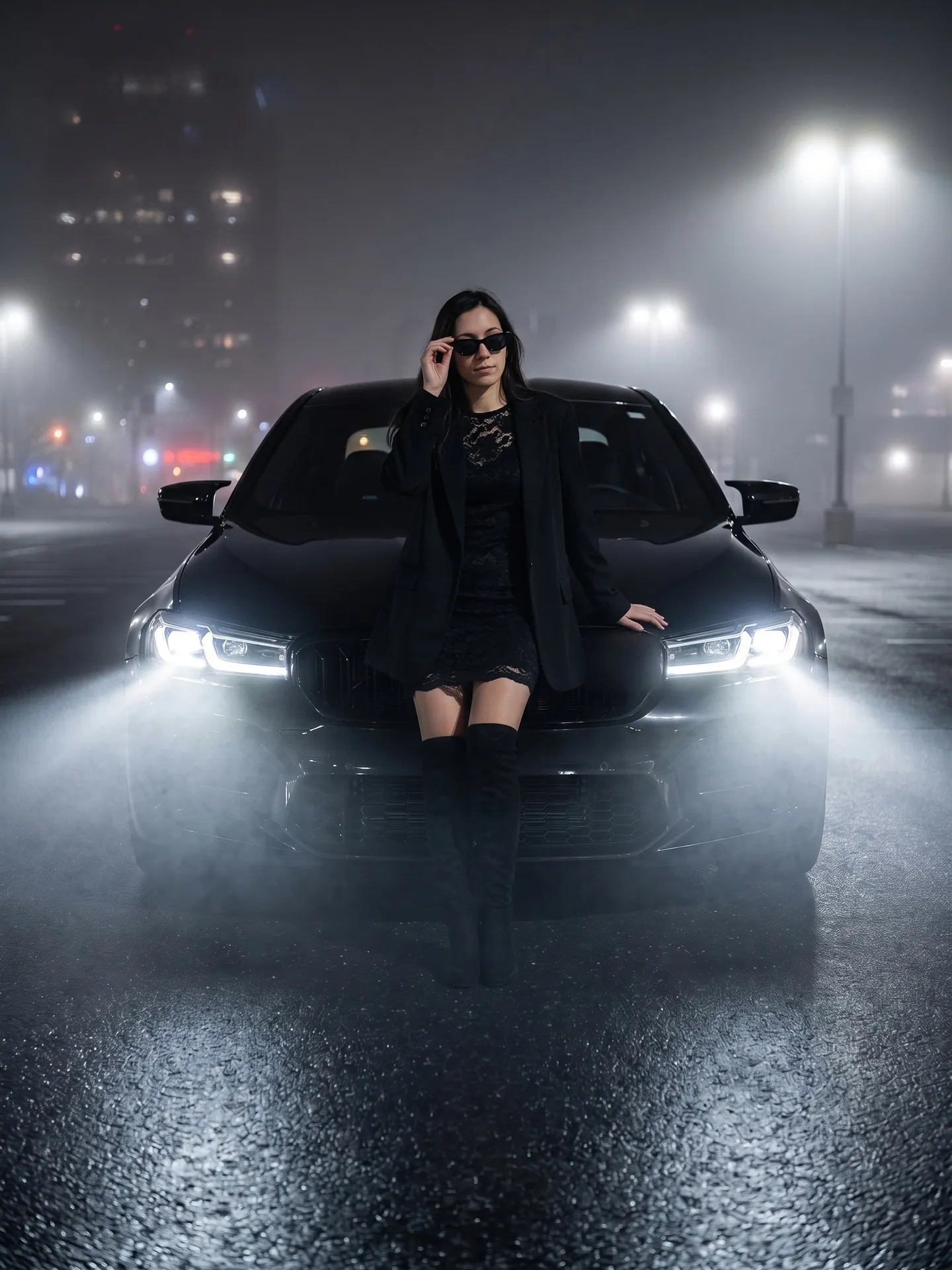
From a woman's photoLace dress, blazer, over-the-knee boots, the F90 front end from the reference.Sample woman, full-length photo, first run. Grille badge blurred by us.Photo with a BMW M5 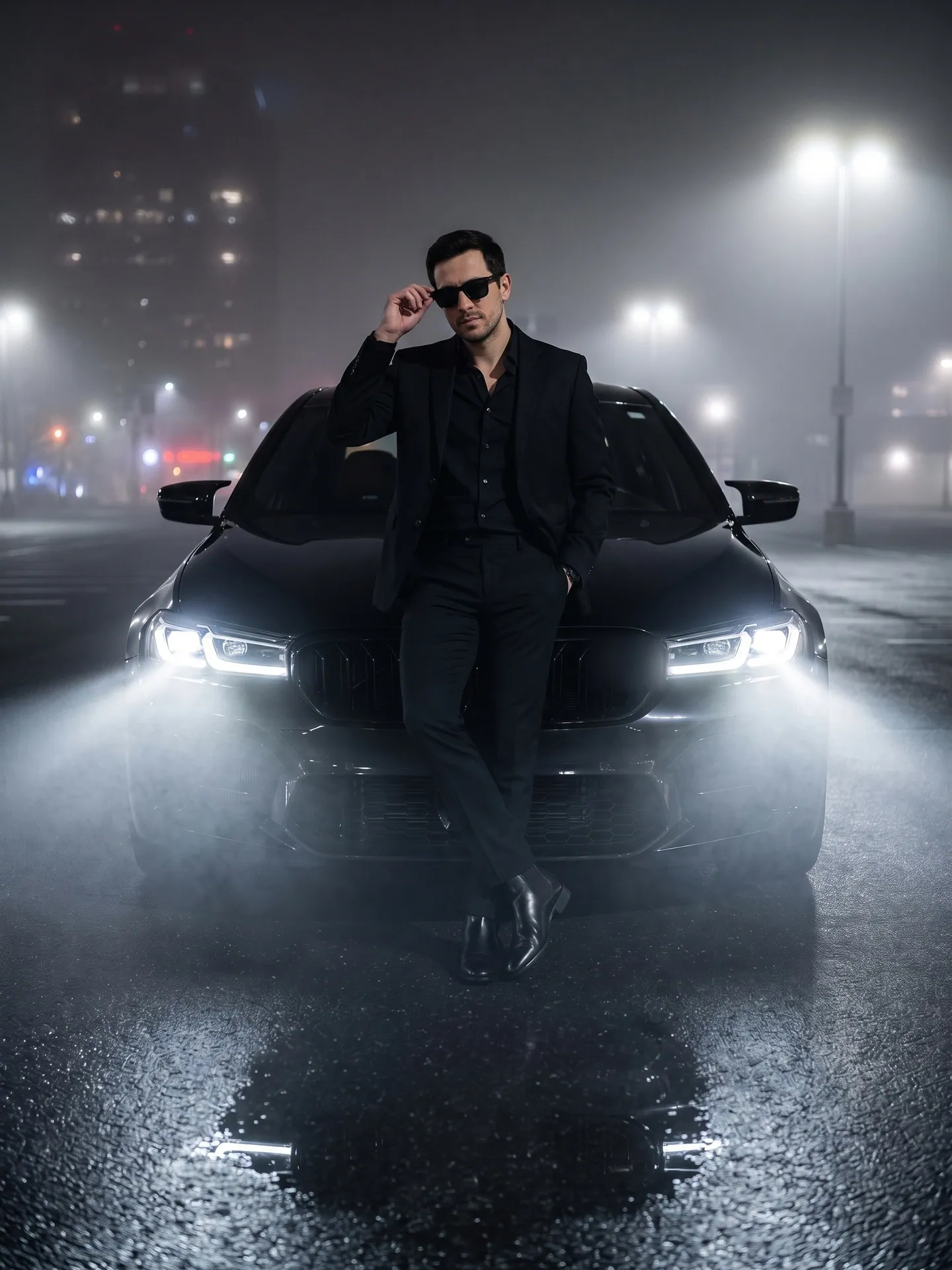
From a man's photoBlack suit and loafers in the same pose. His first run kept the women's boots, so we ran it again.Sample man, full-length photo, second run. Grille badge blurred by us.Photo with a BMW M5
| Prompt in a chat app | Photo with a BMW M5 | |
|---|---|---|
| Which car | The F90 when the prompt names it and its headlights; without that, ours drew an older generation | The F90 M5 Competition, from a reference photo of the car |
| Your face | Usually kept when the prompt asks for it; check it | Kept in all three of our runs |
| Outfit and pose | Whatever you write | Fixed: lace dress and blazer, or a black suit on a man's photo |
| Badges | Can appear even when the prompt says no logos | The grille badge from the reference car stays |
| What you pay | Your chat app's plan | 1 photo a run |
Which car
- Prompt in a chat app
- The F90 when the prompt names it and its headlights; without that, ours drew an older generation
- Photo with a BMW M5
- The F90 M5 Competition, from a reference photo of the car
Your face
- Prompt in a chat app
- Usually kept when the prompt asks for it; check it
- Photo with a BMW M5
- Kept in all three of our runs
Outfit and pose
- Prompt in a chat app
- Whatever you write
- Photo with a BMW M5
- Fixed: lace dress and blazer, or a black suit on a man's photo
Badges
- Prompt in a chat app
- Can appear even when the prompt says no logos
- Photo with a BMW M5
- The grille badge from the reference car stays
What you pay
- Prompt in a chat app
- Your chat app's plan
- Photo with a BMW M5
- 1 photo a run
If the result looks off
- The face changed: run it again with a photo where your face is larger and evenly lit, and keep the "keep my face" sentence first.
- The car is the wrong M5: check that "F90 Competition" and the headlight shape are still in the prompt, or attach a photo of the car as a second image.
- Letters or a plate number appeared: AI text is garbled, so crop it out or run again.
- The fog hides you: add "my face clearly lit by the headlight glow" before the fog sentence.
The same night look works with other cars. The G-Wagon gas station prompt has its own copy-paste version and template, and the Rolls-Royce Selfie puts you in a back seat instead of in front of the hood.