Hairstyle Try-On Apps Compared (2026): See a Haircut on Your Face
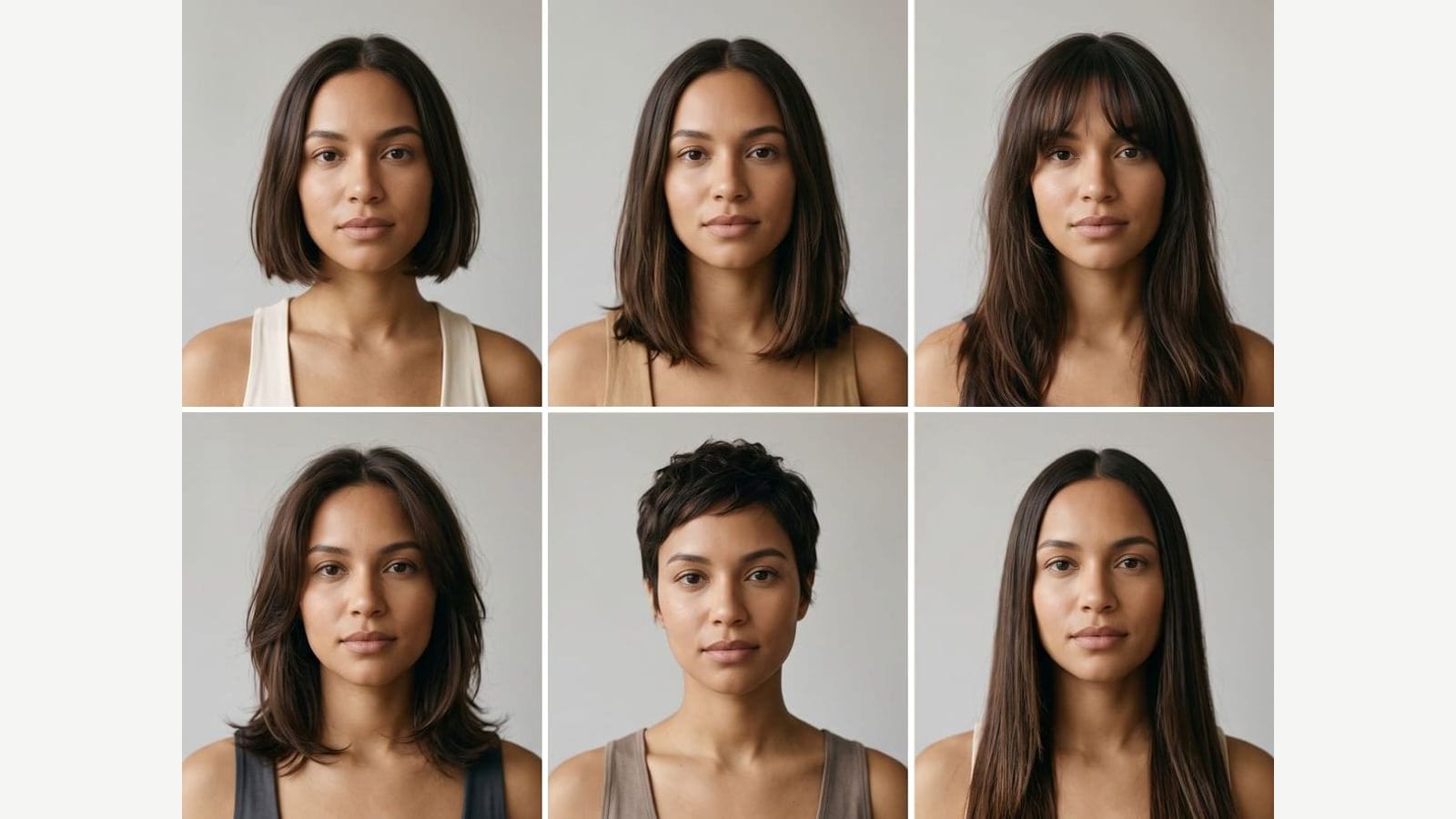
To see a haircut on your own face, upload a selfie to a hairstyle try-on app: FaceApp, YouCam, Fotor, Canva and KBMSoft's Hairstyle Try On let you start free, HairstyleAI sells a one-time pack of 120 HD photos, and Outwow (outwow.app), which we make, returns 1 poster of 6 haircuts on a paid plan. Prices checked October 2, 2026.
In short
- Free to start: YouCam Makeup has free hair content in its app and 5 free credits (2 full previews) in its browser generator; FaceApp says many filters are free; Fotor has a free plan with limited credits; Canva Free includes a monthly allowance of AI uses; Hairstyle Try On by KBMSoft has 33 free styles on iPhone.
- To describe a cut in words, use Fotor or Canva. To try a cut from a reference photo, use YouCam or FaceApp (its Transfer filter, in the women's interface).
- HairstyleAI is a one-time purchase: 30 hairstyles, 4 poses, 120 HD photos, listed as ready in 1 hour. No free tier is listed, but its FAQ offers a refund within 14 days if you haven't trained the AI yet.
- Outwow, our product, returns 1 poster of 6 haircuts in the length and color you choose, from the Basic plan. Its free photos cover the hair templates, not this tool.
How we compared them
This isn't a full list of hairstyle try-on apps. We picked six that cover the common formats and publish enough to compare: phone apps (FaceApp, YouCam Makeup, Hairstyle Try On by KBMSoft), browser tools that edit one photo (Fotor, Canva, YouCam's web generator) and a paid photo pack (HairstyleAI), then added our own. We read each official page, pricing page, help center and store listing and wrote down only what they say; where a page is silent, the table says so. Store prices are from the US App Store and Google Play, copied as shown, and vary by region. We didn't run or buy any of the other apps.
| App | What it does | Free tier | Price as listed | Platforms |
|---|---|---|---|---|
| FaceApp | Hair filters for women and men; the women's interface adds Transfer, which adapts a similar hairstyle from a reference photo | Free download; many filters work free (the site doesn't say which hair filters); a Pro free trial may be available in some countries | Pro, billed monthly or yearly; no prices on the site. US App Store: FaceApp PRO $10.00, $20.00, $60.00, $100.00 (no period shown). US Google Play: $4.99 - $99.99 per item | iPhone and iPad (iOS 17+), Android; the official site links no web version |
| YouCam Makeup and YouCam web generator | App: 250+ preset hairstyles and try-on from a reference photo. Web: 200+ styles and reference upload | App: free and paid hair content; both store listings say it contains ads. Web: 5 credits at sign-up, enough for 2 full previews, no card | US App Store: Premium Version (Monthly) $5.99, $8.99 or $9.99; Premium Version (Yearly) $31.99, $32.99 or $39.99; Pro Monthly Offer $19.99; Pro Yearly Offer $79.99 (a Pro Yearly Offer with Free Trial is also listed). US Google Play: $0.69 - $82.99 per item. Web credit prices: not on a page we could load | iPhone and iPad (iOS 16+), Android; web generator in any browser, phones included |
| Fotor AI Hairstyle Changer | Upload a photo, try preset hairstyles and colors, or type the style you want | Basic plan, free forever, with limited free credits; credits per hairstyle not stated | Web: Pro US$8.99 billed monthly or US$39.99 billed yearly; Pro+ US$19.99 or US$62.99 (yearly marked 30% OFF); Max US$39.99 or US$134.32 (Special Offer; yearly marked 30% OFF). US App Store: Week Plan $6.99, Monthly Plan $8.99, Annual Plan $47.99 | Web; iPhone and Android apps (AI Hairstyle is in both store listings); the site also links Windows and Mac apps but doesn't say they include it |
| Canva AI Hairstyle Changer | Upload a photo, pick a preset or type a look, regenerate to compare; you can open the result in Canva's editor | Free plan US$0: a shared monthly AI allowance of up to 20 Standard or Premium AI uses (the tool page doesn't say which tier it uses) | Pro US$144 /year for one person on the US page, free trial, before tax | Browser; the tool page doesn't mention the mobile apps |
| HairstyleAI | Upload a set of selfies (the FAQ recommends 12 close-ups and 8 upper-body shots), get back photos of you with new haircuts | None listed; the FAQ offers a refund within 14 days if you haven't trained the AI yet | $9 one-time payment: 30 unique hairstyles, 4 different poses/haircuts, 120 HD photos, listed as done in 1 hour | Web; no app mentioned on the site |
| Hairstyle Try On (KBMSoft) | Try styles from its library on a photo you take or pick from your album; more than 50 hair color options for every style | 33 free hairstyles | One-time packs, US App Store: Female Mixed Style Package $0.99, Male Hairstyle Package $1.99, Female Extra Package $2.99, All Packages Combined, 40% Off $4.99 (750+ styles in the description, 800+ on the combined package); the in-app list also shows Bald, Thin & Shaved Package $0.99 and Formal Updos Package $1.99 | iPhone (iOS 15.6+) and Apple-silicon Mac. No Android or web on this listing |
| Outwow Hairstyle Try-On | One selfie in, 1 poster of 6 haircuts out; you choose women's or men's cuts, the length and the color; nothing is scored | 3 free photos once, watermarked: they cover the hair templates, not the tool | Basic plan, $19.99 a month or $149.99 a year with 120 photos a month; 1 photo per run. Hair templates on every plan, Free included | Web, in a phone or computer browser. No native app |
FaceApp
- What it does
- Hair filters for women and men; the women's interface adds Transfer, which adapts a similar hairstyle from a reference photo
- Free tier
- Free download; many filters work free (the site doesn't say which hair filters); a Pro free trial may be available in some countries
- Price as listed
- Pro, billed monthly or yearly; no prices on the site. US App Store: FaceApp PRO $10.00, $20.00, $60.00, $100.00 (no period shown). US Google Play: $4.99 - $99.99 per item
- Platforms
- iPhone and iPad (iOS 17+), Android; the official site links no web version
YouCam Makeup and YouCam web generator
- What it does
- App: 250+ preset hairstyles and try-on from a reference photo. Web: 200+ styles and reference upload
- Free tier
- App: free and paid hair content; both store listings say it contains ads. Web: 5 credits at sign-up, enough for 2 full previews, no card
- Price as listed
- US App Store: Premium Version (Monthly) $5.99, $8.99 or $9.99; Premium Version (Yearly) $31.99, $32.99 or $39.99; Pro Monthly Offer $19.99; Pro Yearly Offer $79.99 (a Pro Yearly Offer with Free Trial is also listed). US Google Play: $0.69 - $82.99 per item. Web credit prices: not on a page we could load
- Platforms
- iPhone and iPad (iOS 16+), Android; web generator in any browser, phones included
Fotor AI Hairstyle Changer
- What it does
- Upload a photo, try preset hairstyles and colors, or type the style you want
- Free tier
- Basic plan, free forever, with limited free credits; credits per hairstyle not stated
- Price as listed
- Web: Pro US$8.99 billed monthly or US$39.99 billed yearly; Pro+ US$19.99 or US$62.99 (yearly marked 30% OFF); Max US$39.99 or US$134.32 (Special Offer; yearly marked 30% OFF). US App Store: Week Plan $6.99, Monthly Plan $8.99, Annual Plan $47.99
- Platforms
- Web; iPhone and Android apps (AI Hairstyle is in both store listings); the site also links Windows and Mac apps but doesn't say they include it
Canva AI Hairstyle Changer
- What it does
- Upload a photo, pick a preset or type a look, regenerate to compare; you can open the result in Canva's editor
- Free tier
- Free plan US$0: a shared monthly AI allowance of up to 20 Standard or Premium AI uses (the tool page doesn't say which tier it uses)
- Price as listed
- Pro US$144 /year for one person on the US page, free trial, before tax
- Platforms
- Browser; the tool page doesn't mention the mobile apps
HairstyleAI
- What it does
- Upload a set of selfies (the FAQ recommends 12 close-ups and 8 upper-body shots), get back photos of you with new haircuts
- Free tier
- None listed; the FAQ offers a refund within 14 days if you haven't trained the AI yet
- Price as listed
- $9 one-time payment: 30 unique hairstyles, 4 different poses/haircuts, 120 HD photos, listed as done in 1 hour
- Platforms
- Web; no app mentioned on the site
Hairstyle Try On (KBMSoft)
- What it does
- Try styles from its library on a photo you take or pick from your album; more than 50 hair color options for every style
- Free tier
- 33 free hairstyles
- Price as listed
- One-time packs, US App Store: Female Mixed Style Package $0.99, Male Hairstyle Package $1.99, Female Extra Package $2.99, All Packages Combined, 40% Off $4.99 (750+ styles in the description, 800+ on the combined package); the in-app list also shows Bald, Thin & Shaved Package $0.99 and Formal Updos Package $1.99
- Platforms
- iPhone (iOS 15.6+) and Apple-silicon Mac. No Android or web on this listing
Outwow Hairstyle Try-On
- What it does
- One selfie in, 1 poster of 6 haircuts out; you choose women's or men's cuts, the length and the color; nothing is scored
- Free tier
- 3 free photos once, watermarked: they cover the hair templates, not the tool
- Price as listed
- Basic plan, $19.99 a month or $149.99 a year with 120 photos a month; 1 photo per run. Hair templates on every plan, Free included
- Platforms
- Web, in a phone or computer browser. No native app
FaceApp: hair filters in a phone app
FaceApp is a phone photo editor with hair tools among its filters. FaceApp's guide to hairstyle filters lists Long, Bob Cut, Haircut and Bangs in the women's interface, plus Transfer, which adapts a hairstyle from a reference photo to your portrait. The men's interface has its own set: Haircut, Hitman (very short), Long, Long 2 and fringe filters, and the App Store listing pitches the app as a way to discover your best hairstyle and color. The app is free to download, and the FAQ says many filters work without paying but doesn't name the free hair filters. Pro opens all filters and removes watermarks, billed monthly or yearly. The site shows no prices and points to the PRO section inside the app; in some countries a free trial may be available. The official site offers only the App Store and Google Play apps, with no web version listed. Pick it for quick previews on your phone, or to adapt a cut from a photo in the women's interface.
YouCam Makeup: a preset library in the app and the browser
YouCam Makeup's App Store listing offers 250+ preset hairstyles and a try-on from a reference photo that can keep your natural hair color. Hair content is part free, part paid, and both the App Store and Google Play listings say the app contains ads. The App Store lists Premium and Pro subscriptions, monthly and yearly, including a Pro yearly offer with a free trial. The same company runs a browser generator with 200+ styles and reference upload: a new account gets 5 free credits, enough for 2 full previews by the page's count, with no card and no download. The page gives two credit costs: its FAQ says each generated style costs 2 credits, and its how-to says each pick uses one credit. Pick it for a few free tries in the browser and a large library in an app.
Fotor: type the haircut you want
Fotor's AI Hairstyle Changer runs in the browser: upload a photo and try hairstyles and colors, or type the style you want, such as a French bob with curtain bangs. The page says a high-resolution preview takes under 3 seconds. The feature is also in Fotor's iPhone and Android apps, by their store listings, and the page footer links to Windows and Mac apps too. The free Basic plan comes with limited credits, but Fotor doesn't say how many credits a hairstyle costs, so we can't tell you how many free tries you get. Paid plans (Pro, Pro+ and Max) bill monthly or yearly. The App Store adds a weekly plan, and its annual plan costs more than the web's Pro yearly plan; the monthly price is the same. Pick it to describe a cut in words and use it across devices.
Canva: a try-on inside a design editor
Canva's AI Hairstyle Changer works in the browser: upload a photo, pick a preset or type a look, then tweak the prompt and regenerate to compare versions. You can open the result in Canva's editor and drop it into a before-and-after template, change the background or resize it for social media. The Free plan includes a shared monthly allowance of up to 20 Standard or Premium AI uses; the tool page doesn't say which tier the changer uses, how many results a run gives, or whether it's in the mobile apps. Pro has a free trial. Canva itself says to treat the result as potential, not a guarantee. Pick it if you also want a before-and-after post.
HairstyleAI: a one-time pack of photos
HairstyleAI (hairstyleai.com) returns a batch of photos instead of instant previews. You upload a set of selfies: the FAQ recommends 12 close-ups and 8 upper-body shots with different expressions, places and backgrounds, and the how-it-works step suggests a plain background, good lighting and a natural smile. It lists 30 unique hairstyles, 4 different poses and 120 HD photos for a one-time payment rather than a subscription, done in 1 hour. No free tier or trial is listed; the FAQ offers a refund within 14 days if you haven't trained the AI yet. No iPhone or Android app is mentioned. The site says it is powered by HeadshotPro, and the footer names Postcrafts PTE LTD. Pick it for many cuts in several poses at one fixed price, if you can wait an hour.
Hairstyle Try On by KBMSoft: one-time packs for iPhone
Hairstyle Try On, an iPhone app from KBMSoft ApS, includes 33 free hairstyles in various lengths and sells more in one-time packages: more than 750 styles in total by the description, 800+ by the combined package's store listing. It also lists more than 50 hair color options for every style. You take a photo or pick one from your album. The app needs iOS 15.6 or later and also runs on Macs with Apple silicon; this listing has no Android or web version. The App Store description doesn't say whether the app uses AI or how it fits a style to your photo. Its App Store privacy section says the developer does not collect any data from the app; that is the developer's own statement, which we didn't check. Pick it on iPhone if you'd rather pay once, in small amounts, than subscribe.
Outwow Hairstyle Try-On: a lookbook, not a verdict
We make this one, so read it with that in mind. Hairstyle Try-On takes one daylight selfie and returns 1 poster of 6 haircuts on your own face. You choose women's or men's cuts, the length (short, medium, long or mix) and the color (keep mine, blonde, brunette, copper or black). You can't upload a reference photo (YouCam and FaceApp's Transfer take one) or type a cut (Fotor and Canva do). Nothing is scored: the poster shows cuts side by side and leaves the choice to you. A run costs 1 photo on the Basic plan ($19.99 a month). The 3 free photos new accounts get don't cover the tool, but they do cover the hair templates below. It runs in a phone or computer browser, with no iPhone or Android app, which FaceApp, YouCam and Fotor have. Uploads are deleted within 24 hours. Pick it for several cuts in the length you choose, on one image you can show a stylist.
- Which Haircut Suits You: Your face shape, six haircuts that suit you and three that don't. When we tested it for our face-shape guide, the cut list was the same for everyone of one gender.
- 10 Haircuts on You: Ten haircuts tried on your face, each with a benefit and a verdict. Your own hair color stays in every frame.
- Hair Color Match: Six hair colors on your own face, with the best fit marked. Your cut stays the same.
- Each costs 1 photo a run on every plan, Free included.
Which one to pick
- Free, on your phone: YouCam Makeup (free hair content), FaceApp (many filters free; Pro removes watermarks) or Hairstyle Try On by KBMSoft (33 free styles, iPhone). YouCam and FaceApp can work from a reference photo (FaceApp's Transfer is in its women's interface); neither says whether that feature is free.
- Free, in a browser with no download: YouCam's web generator (5 credits), Fotor's free plan, Canva Free (monthly AI allowance) or Outwow's hair templates (3 free photos once, watermarked).
- To describe a cut in words: Fotor or Canva.
- For a before-and-after post: Canva.
- Many photos for one price, no subscription: HairstyleAI.
- iPhone, small one-time purchases: Hairstyle Try On by KBMSoft.
- Several cuts in a length you set, on one poster for your stylist: Outwow Hairstyle Try-On, from the Basic plan.
No app here can show how a cut will behave on your real hair: texture, density, cowlicks and your morning routine all change it. Save the version you like, find a real photo of the same cut from the side or back, and show both to your stylist. To shortlist cuts first, see our face-shape guide; before you upload a selfie anywhere, run through our privacy checklist.