Turn a Photo Into a Royal Portrait of Your Child
Little Royal Portrait · AI photo template · from 1 photo
Your kid as a storybook princess, prince or knight in a palace.
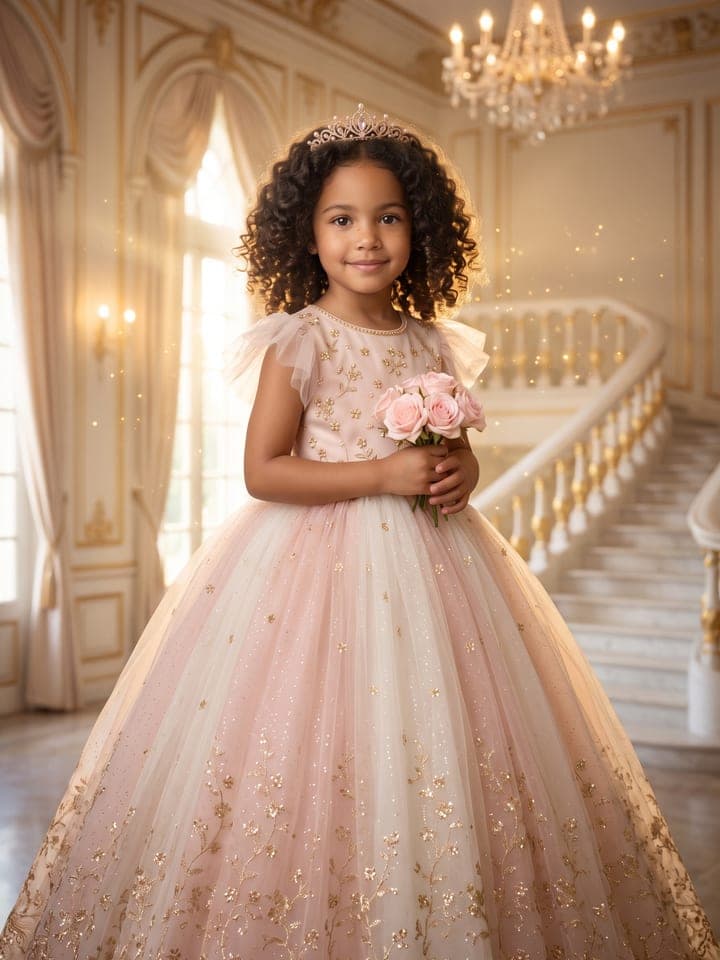
Example result. Yours is made from your own photo.
A storybook royal portrait of your child from one photo: a princess in a blush-pink ballgown and a tiara, a prince in a velvet cape and a small gold crown, a little knight in shining armor or a royal of an enchanted forest, set in a palace world with soft, glowing golden light. Your kid's face, smile, hair and age stay exactly as they are, with no makeup and no grown-up styling.
1 photo
per result
Shapes: 9:16 · 3:4 · 4:5 · 1:1 · 4:3 · 16:9. Example shown in 3:4. How photos are counted
- For parents and guardians. Photos of children are deleted within 24 hours.
How to make a royal portrait of your kid with AI
To turn a photo into a royal portrait of your child, upload one clear picture of your kid to Little Royal Portrait and pick a look: Princess, Prince, Knight or Forest royal. The result stays a real photograph: your child's own face in a child-size outfit with a small crown or tiara (the knight holds a plumed helmet instead), in a palace hall, a throne room, a castle hall or a forest glade. One run is 1 photo on the Free plan, so a new account's 3 free photos work here too.
- Put one photo in Photo of your kid: your child alone, face clearly visible, in daylight. Siblings each get a run of their own.
- Choose the Look. Each brings its own room: a sunlit palace hall, a candlelit throne room, a stone castle hall, or a forest glade with an old château far off in the mist.
- Tick the parent-or-guardian box, then press Create (1 photo).
What stays exactly your child's?
Only the clothes, the brushing of the hair, the setting and the light change. Face, skin tone, freckles, dimples, ears and glasses carry over, and so does the kind of smile: a gap-toothed grin keeps its gaps and closed lips stay closed. No makeup, no jewelry besides the crown or tiara (earrings only if your child already wears them), and every neckline sits at the collarbones.
We tested it on four AI-generated children, not real kids: a curly-haired girl with a gap tooth, a freckled boy with protruding ears, a girl in pink round glasses and a ginger baby. All of those details came through. One early Forest royal run gave the boy slightly pointed ears, so the template now pins rounded human ears. There are no before-and-after pairs here: we don't publish results made from children's photos, not even synthetic ones. The cover shows an invented child made from a text description, with more of the gown than a run shows.
What can you use it for?
- A keepsake print for a bedroom wall or a grandparent's shelf.
- The picture on a princess or knight party invitation; the portrait has no text, so the date goes in your card editor.
- Mom in a ballgown beside her daughter: the adult version is Fairytale Princess Portrait.
How do I pick the right photo of my kid?
- Choose the expression you love most. The smile is kept rather than replaced, so a shy closed-mouth smile stays shy.
- For a baby or toddler, pick the look by the seat: a velvet cushion on the palace stairs (Princess), a cushion on the throne (Prince), a wooden bench with the helmet in the lap and no sword (Knight), or a mossy root (Forest royal). Little ones always sit, framed down to the lap.
- Glasses worn every day belong in the photo: their frame shape and color are kept, and a photo without them gives a portrait without them.
- Forest royal is the one look that follows the child: a girl gets an ankle-length gown under the sage cape, a boy a tunic over leggings and boots. Prince worked on a girl in our tests unchanged.
What goes wrong most often?
- Expecting shoes and the floor. A standing child is framed from just above the head to about the knees so the face stays large; one test run slipped to full length, and the framing was fixed.
- Hoping the knight raises the sword. It stays in its scabbard, and the plumed helmet is held at the hip so the face shows.
- Uploading the child on a parent's lap. The portrait shows one child and nobody else, with no names, crests or flags. For a superhero instead, Little Hero takes the same kind of photo.
Guide: Is It Safe to Upload Your Face to an AI Photo App? A 7-Point Checklist
What you need
Photo of your kid
Face clearly visible, daylight, only your kid in frame.
- You pick the look
- Princess, Prince, Knight, Forest royal
Works well
- Only your child in the frame, face clearly visible
- Daylight
Avoid
- Other children or adults in the shot
- Photos of a child you're not the parent or guardian of