Minecraft Papercraft of Yourself From One Photo
Minecraft Figure of Yourself · AI photo template · from 1 photo
A printable pixel net: head, body, arms and legs, with assembly views.
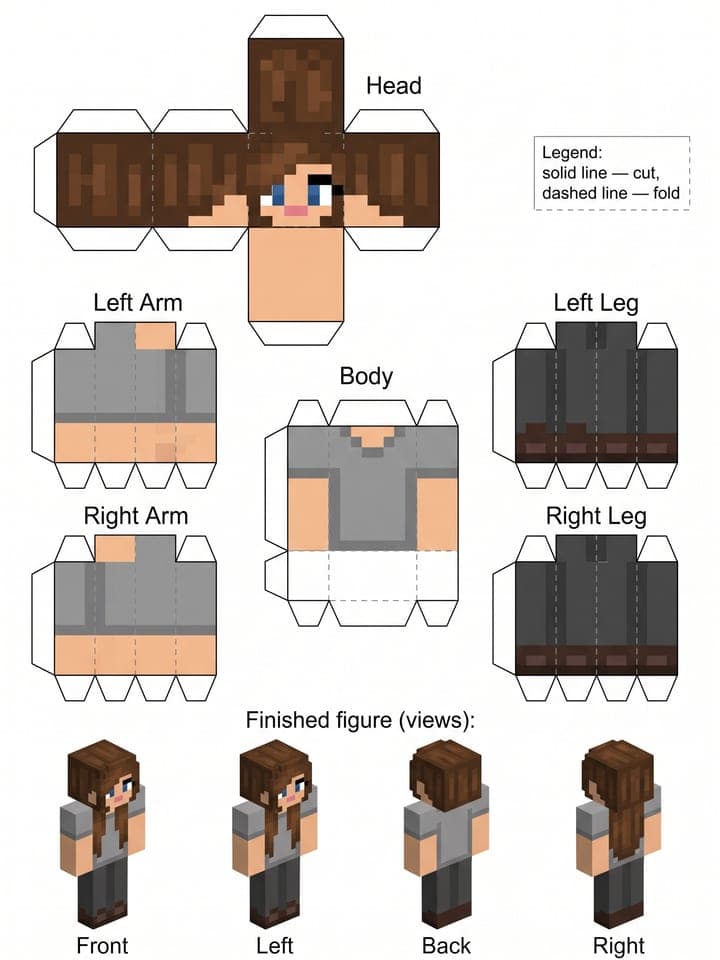
Example result. Yours is made from your own photo.
A ready papercraft sheet from your photo: a Minecraft-style paper figure of you in big pixels, with head, body, arm and leg nets, cut and fold lines, glue tabs and four views of the finished figure. Print, cut, glue.
1 photo
per result
Shapes: 3:4 · 4:3. Example shown in 3:4. How photos are counted
- For parents and guardians. Photos of children are deleted within 24 hours.
- Not an official Minecraft product. Not approved by or associated with Mojang or Microsoft.
How to make a Minecraft-style paper figure of yourself with AI
To make a Minecraft papercraft of yourself, upload one photo of you or your kid to Minecraft Figure of Yourself: 1 photo per sheet on any plan, and new accounts can try it with 3 free photos. It returns a printable sheet in large pixels: a cube head with your pixel face and hair, a six-panel body strip and separate box nets for both arms and both legs, with cut and fold lines, glue tabs and four small views of the built figure.
- Pick a daylight photo of one person where the face and the whole outfit are easy to see. Clothes become the colors of the body, arms and legs, so a shot that shows trousers or a skirt gives the legs real colors to copy.
- Upload it to Your photo or your kid's; a sheet costs 1 photo. There are no fields to fill in, since the parts, labels and legend are fixed.
- Print the sheet and build the head first: it is the cross-shaped net labeled Head. The four small views of the finished figure show how the blocks stack.
What can you use it for?
- A party-table craft for a kid who plays the game, with their own face on the head block.
- A family row on a bookshelf: one sheet per person, each made from that person's photo.
- A desk figure of yourself next to the monitor.
- A rainy-day build for a parent and child working on two sheets side by side.
Which photo makes a better pixel figure?
- Go for an outfit with one strong color or a simple pattern. In big pixels a red hoodie or a striped top still reads as yours, while a small print or a tiny logo has too few pixels to survive.
- The head cube carries your face on the front, the back of your head on another panel and the hair on top, so a photo where the hairstyle and its color are clear gives three of its panels something to copy.
- For your kid's figure, use a photo of them alone in the clothes they'd want to be built in, like a favorite sweater or dress.
- Use stiff card rather than office paper. Each arm and leg is a strip of four narrow panels, and firm paper keeps those small blocks square.
What goes wrong most often?
- Expecting a skin file for the game. The result is an image of a sheet to print and fold, not a skin you can load into Minecraft.
- Expecting a realistic face. The face is translated into pixels by design, like a game skin, and is meant to read as you through hair, skin tone and clothes rather than fine features.
- Uploading a group photo. One sheet builds one figure, so the photo should show one person.
- Uploading a pet or a drawing. This one is built for a person: for your dog or cat in the same blocky look, use Minecraft Figure of Your Pet; for a character your kid drew, Drawing to Paper Figure.
What you need
Your photo or your kid's
Face and clothes clearly visible, daylight, one person.
Works well
- A sharp photo with the face clearly visible
- Good, even light
Avoid
- Blurry photos and heavily compressed screenshots
- Faces hidden by hands, hats or shadows