Look Through the Fingers
AI photo template · from 1 photo
The viral black-and-white portrait: your eyes through your fingers.
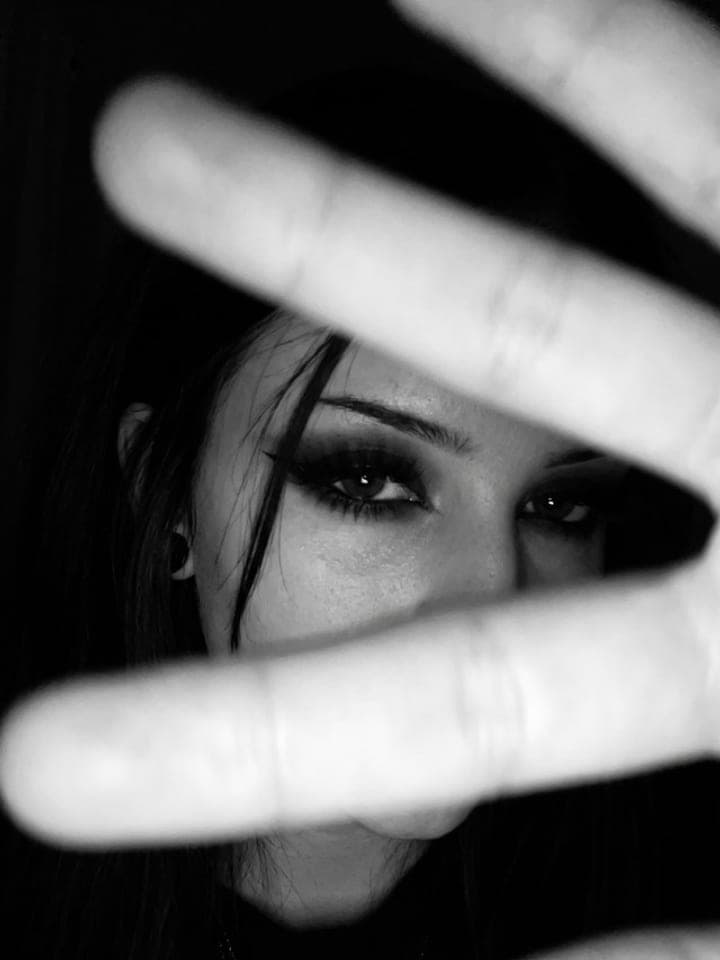
Example result. Yours is made from your own photo.
A very dark black-and-white phone selfie with flash: fingers close to the lens cover the frame and leave a narrow strip with your eyes. Smoky winged liner, a heavy half-closed gaze, grain and a little motion blur.
1 photo
per result
Shapes: 9:16 · 3:4 · 4:5. Example shown in 3:4. How photos are counted
How to make the eyes through fingers selfie with AI
To make the eyes through fingers selfie with AI, upload one close-up selfie to Look Through the Fingers and press Create: it costs 1 photo, and it runs on the Free plan, so the 3 photos a new account gets cover a first try. You get a vertical black-and-white flash photo, very dark and grainy, where fingers held close to the lens cover most of the frame and leave a narrow strip with your eyes and brows.
- Pick a selfie where both eyes are open, sharp and free of glasses or stray hair. Your eyes and brows are the main features left in the result, so they carry most of the likeness.
- Start the run (1 photo). The fingers, the flash, the monochrome grade and the smoky makeup belong to the template; nothing needs setting.
- Save the picture from My creations. It is meant to look like a quick shot taken on the move, so grain and a slight smear are expected, not a fault.
What does the look-through-the-fingers selfie copy?
It imitates a phone selfie taken in the dark with the flash on and a hand right in front of the camera. Fingers that close to the lens are too near to focus on, so they turn into large blurred shapes, and what stays readable is a slit across the middle with the eyes in it. In the template that slit is a horizontal band, a few strands of hair fall over it, and the gaze is heavy and half-lidded.
Makeup comes with the look whatever you wore in your photo: winged liner in an eastern style, blended shadow and long, fluffy lashes. The shadows stay deep black and the skin is left untouched, with natural texture and only light grain.
Which selfie works for an eyes-only shot?
- Leave your brows as they are. The template lowers them a little but keeps their arch, and brow shape is one of the few things in the frame that says it's you.
- A bare face is fine. Liner, shadow and lashes are drawn on, so there is no need to do your makeup before taking the selfie.
- Most of your nose, mouth and jaw ends up behind the fingers, so an awkward smile or a slightly crooked angle in the original matters less here than in a full-face template.
- For a monochrome portrait where your whole face shows, use AI black and white portrait instead.
What goes wrong most often?
- Expecting color. Every run is black and white; this template has no color version.
- Re-running because the image looks smeared. Motion blur and grain are written into the look on purpose.
- Uploading a shot where you blink or squint. The template works from your own eyes and brows in the selfie and half-closes the lids itself, so give it fully open eyes to start from.
What you need
Your selfie
Close-up, daylight, one face. No filters or sunglasses.
Works well
- Your face close to the camera, looking straight in
- Daylight from a window in front of you
- Only you in the frame
Avoid
- Sunglasses, masks or hair over your eyes
- Beauty filters and heavy edits
- Dark rooms and photos taken from far away