Me and My Fluffball
AI photo template · from 1 photo
A sideways shot: a kitten covers your face except the eyes, same color.
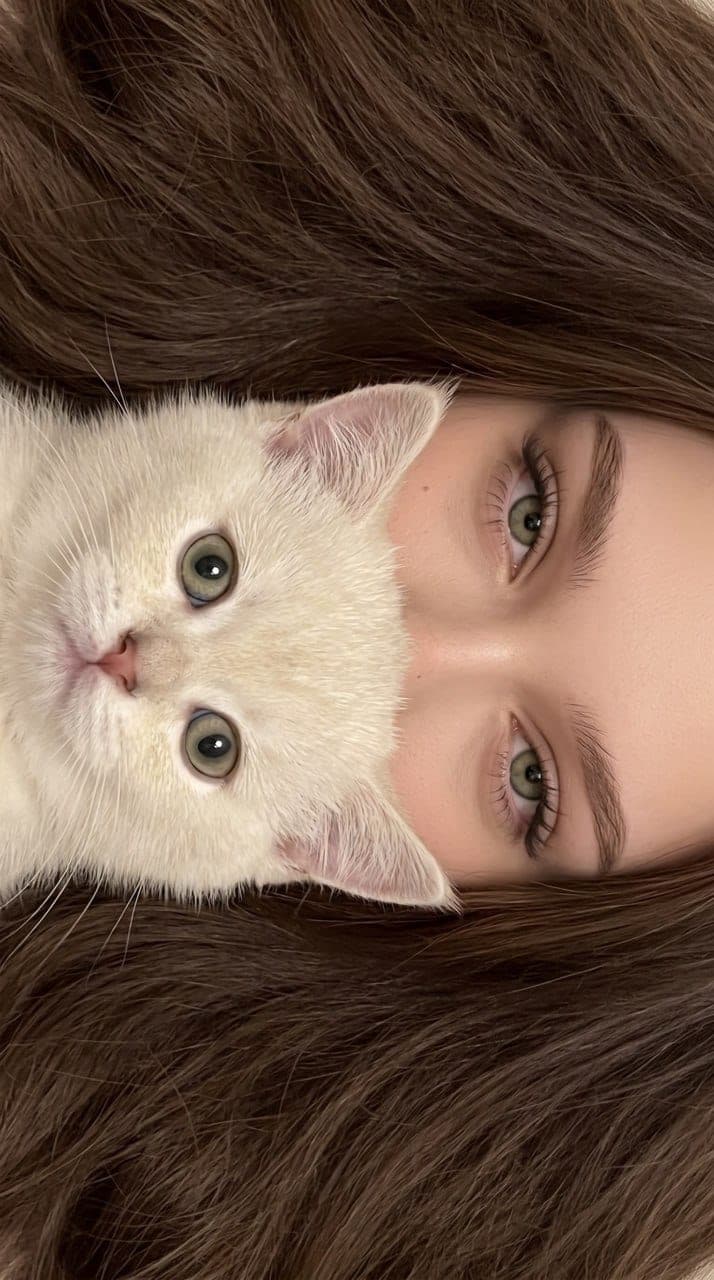
Example result. Yours is made from your own photo.
A phone photo rotated sideways: a fluffy kitten presses against the lower half of your face, so only your eyes and brows show, and the kitten's eyes match yours. Warm soft light, no background.
1 photo
per result
Shapes: 9:16 · 3:4 · 4:5. Example shown in 9:16. How photos are counted
How to do the kitten photo trend with AI
To do the kitten photo trend with AI you need a selfie, not a cat: upload it to Me and My Fluffball (1 photo per run, Free plan) and you get a tall phone shot turned sideways, a fluffy kitten pressed against the lower half of your face so only your eyes and brows show. The kitten looks straight into the lens, and its eyes are matched to your eye color.
- Upload a daylight close-up where your eye color is easy to see. The kitten's eyes copy that color, so a dim or orange-tinted photo shifts the shade for both of you.
- Press Create; the run is 1 photo. One kitten, the sideways framing and the soft warm light are fixed.
- Download it, and rotate it a quarter turn in your gallery if you'd rather see both faces upright in a horizontal frame.
Why is the photo sideways?
The look is a phone photo turned 90 degrees, the kind you tilt your head to read. Your face fills the right side with your eyes stacked one above the other, and the kitten lies the same way on the left, level with you. Its cheek covers your nose and mouth completely, and both faces sit on one flat plane with equal sharpness and no background blur, so the two pairs of matching eyes read side by side as the point of the picture.
What should I know about my selfie for this one?
- Keep your brows in view, not under a fringe or a cap. Next to your eyes they're the main part of your face left in the shot, and the template keeps them as they are in your selfie.
- Hair length and texture in the selfie don't matter, only the color. Every run gets long wavy hair filling the top and bottom of the frame, in the color from your photo.
- No need to smooth your skin in an app first. The template gives every run a beauty-filter finish with no pores and no freckles, so freckles you have won't show.
- Your own pet can't be swapped in. For a picture with your real cat or dog, use Me and My Pet, which takes a photo of each of you.
What goes wrong most often?
- Uploading a selfie with tinted contact lenses or colored party lights. Both pairs of eyes take on that color.
- Expecting a particular coat or breed. The kitten isn't drawn from any photo, so its look isn't something you set.
What you need
Your selfie
Close-up, daylight, one face. No filters or sunglasses.
Works well
- Your face close to the camera, looking straight in
- Daylight from a window in front of you
- Only you in the frame
Avoid
- Sunglasses, masks or hair over your eyes
- Beauty filters and heavy edits
- Dark rooms and photos taken from far away