Neon Selfie
AI photo template · from 1 photo
Front-camera night selfie: thick hair, red rim light from car lights.
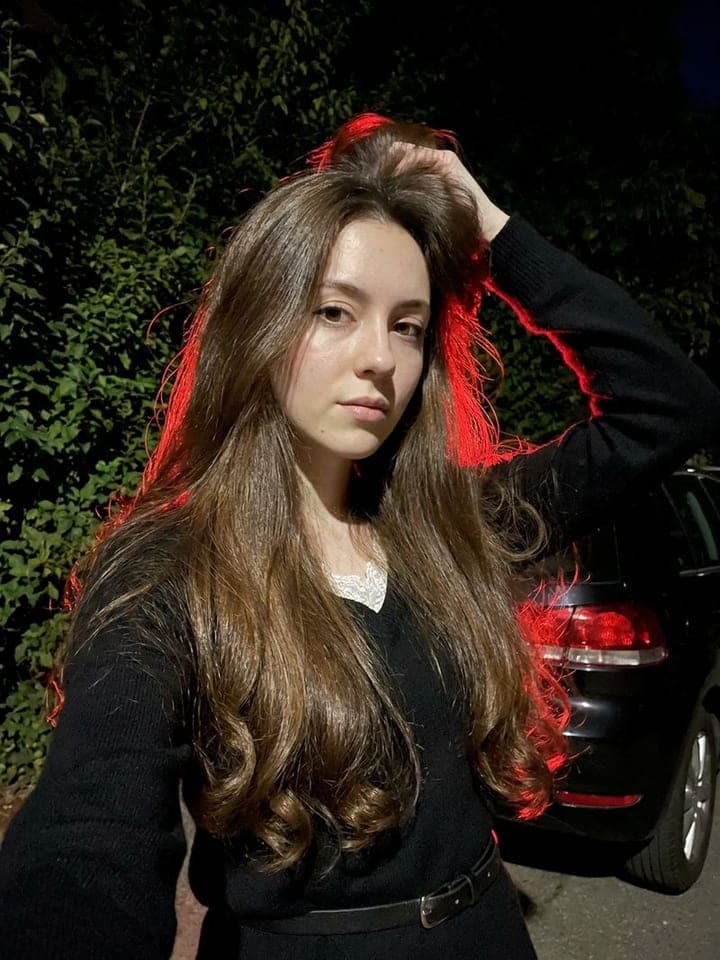
Example result. Yours is made from your own photo.
A realistic front-camera selfie at night: very long thick glossy hair, a black sweater with a white lace collar, a hand lifting the hair. Dark foliage behind and a bright red glow from a parked car outlining your hair and shoulders.
1 photo
per result
Shapes: 9:16 · 3:4 · 4:5 · 1:1 · 4:3 · 16:9. Example shown in 3:4. How photos are counted
How to make a red rim light selfie with AI
To make a red rim light selfie with AI, upload one daylight selfie to Neon Selfie: 1 photo per run on the Free plan, and a new account's 3 free photos let you try it first. You get a realistic front-camera shot at night: long, thick, glossy hair lifted by one hand, a black sweater with a white lace collar, and the red rear lights of a parked car behind you tracing your hair and shoulders.
- Use a selfie taken in normal light with your face toward the camera. The red glow is added from behind, so your face has to read clearly without it.
- Tap Create (1 photo). The car, the foliage, the sweater and the pose come built in.
- Keep the outline of your hair in any crop you make later, since that edge is where the red light sits.
Why is it called neon if there's no neon in it?
There are no neon signs in the frame. The color comes from the rear lights of a black car parked on the right, behind you. A light placed behind a subject draws a bright line along its edges, which photographers call a rim light; here it is saturated red and traces the outline of your hair and shoulders. The rest is night: dense dark-green foliage sunk in shadow, and the phone that took the selfie is nowhere in sight.
What can you use it for?
- A moody night profile picture that wasn't taken under a streetlight.
- The cover of a night-out story highlight.
How do I get a better result?
- Your hair is rebuilt: very long, very thick and straight with curled ends and a glossy shine, whatever its length in the photo. The template describes its length and shine but not its color.
- Both eyes visible in the selfie help. The pose turns your face half-sideways with the head tilted toward one shoulder, built from a front-facing shot.
What goes wrong most often?
- Uploading a selfie that's already red or purple from party lights. The template adds red of its own, and a tinted face loses its real skin tone.
- Expecting a city background. Behind you there is only dark foliage and the silhouette of the car.
What you need
Your selfie
Close-up, daylight, one face. No filters or sunglasses.
Works well
- Your face close to the camera, looking straight in
- Daylight from a window in front of you
- Only you in the frame
Avoid
- Sunglasses, masks or hair over your eyes
- Beauty filters and heavy edits
- Dark rooms and photos taken from far away