Turn Yourself Into a Pixar Character From One Selfie
Pixar Character · AI photo template · from 1 photo
You as the hero of a 3D animated film from a big studio.
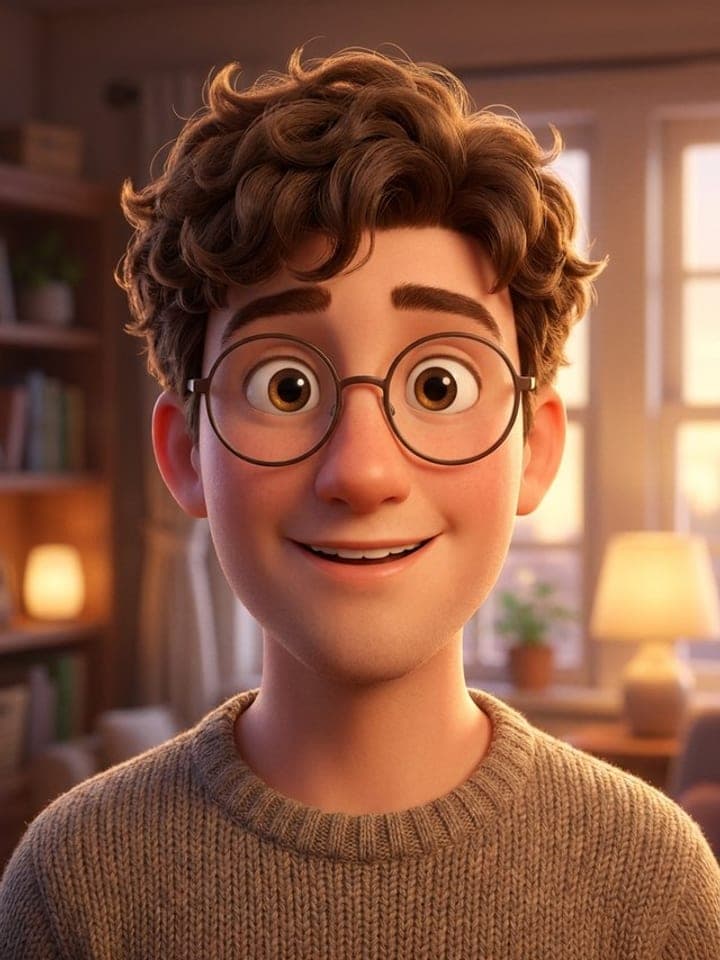
Example result. Yours is made from your own photo.
You as a character from a 3D animated feature in the style of a major animation studio: big expressive eyes, soft rounded features, cartoon sheen on skin and hair, warm cinematic light and a friendly close-up. Made from one photo.
1 photo
per result
Shapes: 9:16 · 3:4 · 4:5 · 1:1 · 4:3 · 16:9. Example shown in 3:4. How photos are counted
How to turn yourself into a Pixar-style character with AI
To turn yourself into a Pixar character, upload one selfie to Pixar Character and you get a close-up of you as the hero of a 3D animated feature: big expressive eyes, soft rounded features, a cartoon sheen on skin and hair, warm cinematic light and a background in soft focus. A run costs 1 photo on any plan, and a new account's first 3 photos are free. It is an unofficial fan-style look; Outwow is not affiliated with Pixar or Disney.
- Pick a selfie taken in daylight, facing the camera, with your hairline and hairstyle in view. Leave sunglasses off: the eyes are the feature this style enlarges most.
- Press Create (1 photo). There is nothing to choose, because the animated-film look, the warm light and the close-up framing are fixed by the template.
- Save the portrait from My creations. Each run draws the character again, so a second run with the same selfie gives you another version to compare.
What makes a face look like it came out of an animated feature?
Studio 3D animation has a recognizable recipe for faces: eyes larger than life so that every feeling reads at a glance, cheeks and noses with no sharp edges, and skin and hair with a glossy cartoon sheen. Warm key light and a shallow focus finish the movie-still feel. The template's prompt asks for those parts one by one, plus a lively, friendly expression, so what comes back is a cheerful close-up portrait, not a full-body character standing in a scene.
What can you use it for?
- Matching portraits for a couple or a group of friends, each made from their own selfie and posted side by side.
- The front of a birthday card or an invitation to an animated-movie night.
- A cartoon avatar for the family group chat that looks friendlier than a passport-style selfie.
Which selfie gives the most recognizable cartoon version of me?
- Show what people know you by. With the eyes enlarged and the features rounded on purpose, a beard, freckles, a widow's peak or a heavy fringe carry much of the resemblance, so keep them visible and uncovered.
- Frame your face large and roughly straight on. The result is a close-up, so a profile view or a far-away shot leaves the template to guess at the half of the face it can't see.
- Expect a friendly face even if yours is serious. The prompt asks for a lively, friendly emotion, and a relaxed selfie with a slight smile lines up with it better than a stern one.
- Window light is enough. The warm cinematic glow is added by the template, while a colored lamp or a neon-lit room in your photo can shift your skin tone in the drawing.
What goes wrong most often?
- Expecting a specific movie character, a princess dress or a superhero suit. There is no character, costume or outfit option; you come back as yourself, drawn in the animated style.
- Uploading a child's photo. This template is made for an adult's selfie; for a child, a parent can use Kid as a 3D Character, which keeps kid proportions and never makes them look older.
- Looking for a live camera preview. Nothing is applied in real time: the image is made once from a still photo and appears in My creations when it is done.
What you need
Your selfie
Close-up, daylight, one face. No filters or sunglasses.
Works well
- Your face close to the camera, looking straight in
- Daylight from a window in front of you
- Only you in the frame
Avoid
- Sunglasses, masks or hair over your eyes
- Beauty filters and heavy edits
- Dark rooms and photos taken from far away